Set up AAA
Before you start
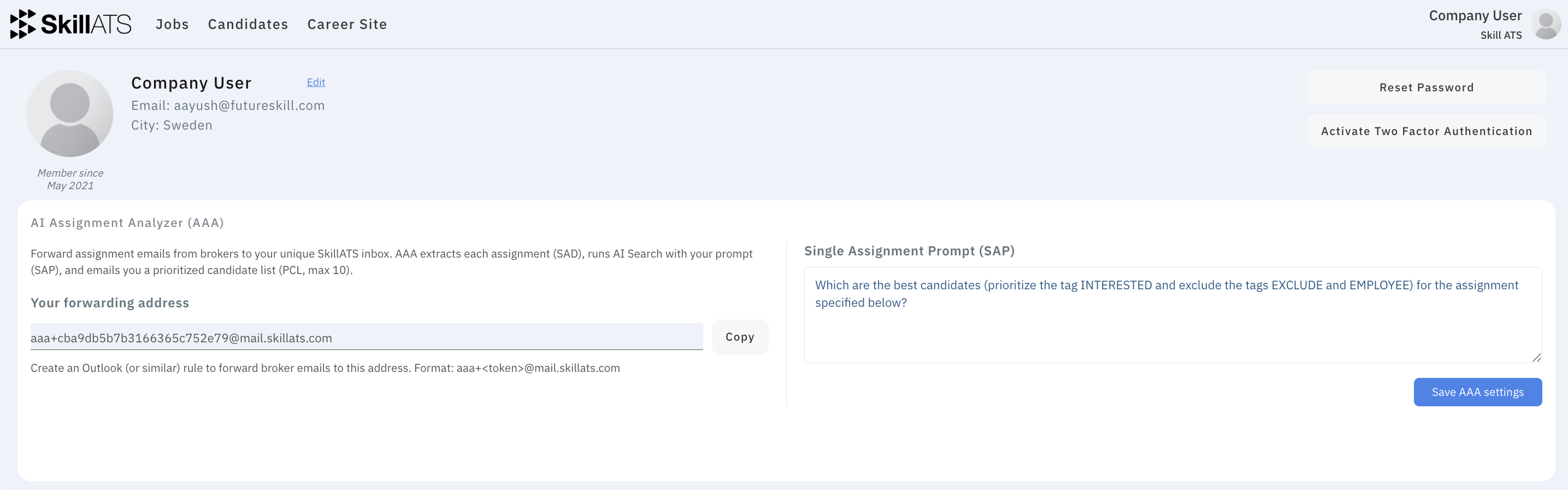
- You’re signed in as a recruiter
- You can create a forwarding rule in Outlook, Gmail, or similar
- You know how your team likes to shortlist (skills, location, seniority, ratings, etc.)
Steps
1. Open your profile
From the dashboard or account menu, open Profile (your own profile — not another person’s).
2. Find AI Assignment Analyzer (AAA)
You’ll see:
- Your forwarding address (unique to you)
- A text box for your prompt — instructions used for every assignment
3. Copy the forwarding address
Click Copy and keep the address private. Only you should forward mail to it.
4. Create an email rule
In Outlook (or your mail app), forward broker/assignment emails to that address. For example:
- When the sender is a known broker, or
- When the subject mentions an assignment
→ Forward to your SkillATS AAA address.
5. Write and save your prompt
Describe what a good match looks like for your team. Save with Save AAA settings. The prompt cannot be empty.
Checklist
- [ ] Address copied
- [ ] Forwarding rule is on and you tested with a sample email
- [ ] Prompt saved
- [ ] You receive AAA result emails (check spam once after the first test)